Senin, 29 April 2013

Posted by Mahendra Puji
2 comments | 18.26
Berikut ini adalah distribusi materi untuk UTS IT for Teaching, semester genap tahun akademik 2012/2013.

Silahkan di download sesuai dengan kelas dan jadwal UTS
untuk download file (Material / Test Item) silahkan klik pada jam sesuai dengan kelas dibawah ini:


CLASS DATE MATERIAL TEST ITEM SUBMITTED FILE
3 - A Tuesday, April 30, 2013 8:10:00 AM 12:00:00 AM 1:40:00 PM
3 - B Tuesday, April 30, 2013 8:10:00 AM 10:40:00 AM 12:00:00 AM
3 - C Friday, May 03, 2013 12:00:00 AM 1:40:00 PM 3:20:00 PM
3 - D Friday, May 03, 2013 12:00:00 AM 3:20:00 PM 5:00:00 AM
3 - E Thursday, May 02, 2013 12:00:00 AM 1:40:00 PM 3:20:00 PM
3 - F Thursday, May 02, 2013 12:00:00 AM 3:20:00 PM 5:00:00 AM

Semua file mempunyai Password, untuk akses password silahkan hubungi PJMK masing-masing kelas.
PJMK mohon mengambil berkas UTS IT for teaching (Daftar hadir, Label CD, Segel. Amplop) di ESR sebelum jam pengumpulan file berakhir.



Selasa, 09 April 2013

Posted by Mahendra Puji
No comments | 16.39
Dikarenakan minggu ini (9-12 April 2013) tidak dapat melaksanakan perkuliahan dikelas, maka perkuliahan di laksanakan secara On Line melalui website resmi IT For Teaching (www.mahendrapuji.com), adapun materi pada pertemuan ninggu ini adalah Aplikasi Ms Office Power Point dalam pengajaran Listening dan Reading (materi dan grade bebas). 

Beberapa point yang dipelajari adalah sebagai berikut:
  1. Mengelola slide menggunakan Slide Master pada Ms. Office Power Point
  2. Insert Object dan Text
  3. Pengaplikasian Animasi pada Object atau Text
  4. Penggunaan Trigger untuk membuat layout slide interaktif
semua materi sudah disampaikan pada pertemuan sebelumnya, dan minggu ini difokuskan untuk pembuatan produk, dan dikerjakan secara kelompok , yang dibagi oleh PJMK - IT for teaching dengan ketentuan sebagai berikut:
  • 1 Kelompok / Group terdiri dari maksimal 4 mahasiswa.
  • Anggota dari kelompok / Group tersebut harus 1 kelas yang sama.
  • 1 Kelompok / Group harus mempunyai Alamat Email (1 email address saja untuk 1 kelompok)
  • 1 kelas terdapat 2 bagian kelompok, yaitu Group SMP dan Group SMA (pembagian tingkat dan materi)
Tugas dapat di Download pada Link dibawah ini sesuai dengan kelas masing-masing.
(Link akan aktif otomatis pada hari Rabu Pkl 13.40 wib - kelas A, B, E, F, hari jumat Pkl: 13.40 wib kelas C, D)

 Selamat mengerjakan

Mahendra Puji. P.A, S.Pd

Selasa, 12 Maret 2013

Posted by Mahendra Puji
No comments | 09.21

PptPlex is an Office Labs experiment that uses Plex technology to give you the power to zoom in and out of slide sections and move directly between slides that are not sequential in your presentation.

System requirements

Supported operating systems: Windows 7, Windows Vista, Windows XP
Windows XP, Windows Vista & Windows 7 32/64 bit Microsoft Office PowerPoint 2010 or 2007 Office language must be set to English for all functionality to work as designed.


Instructions
1) Check that your computer meets the requirements 
2) Download and install pptPlex 
3) Open a presentation in PowerPoint 
4) Click the pptPlex tab at the top to see all the buttons needed to use pptPlex. 
5) Click the “insert new section” button to add a few sections. 
6) Click the “Canvas background” button to select a background for the canvas. 
7) Click the “From Overview” button to view your presentation.


PptPlex is a new project from Microsoft Office Labs as a new method for slide prsentation with Power Point 2007. pptPlex uses Plex technology to give you the power to zoom in and out of slide sections and move directly between slides that are not sequential in your presentation. pptPlex is an Add-in that allow us to group our presentation slide in one Canvas.


Things with pptPlex :
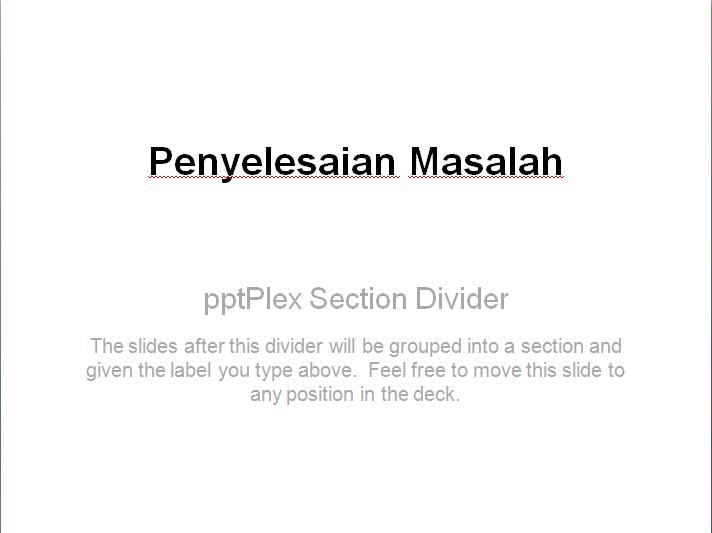
1.Section
Section is a feature to divide our slide.


How to Use Section Tutorial:

watch the video here


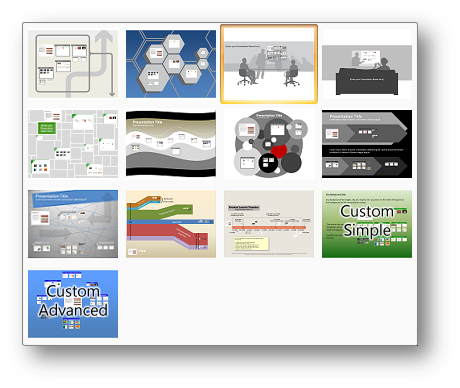
2.Canvas Background / Overview
Overview is a Canvas of a whole presentation which divided into a few section.

How To Make a Background in a Canvas:


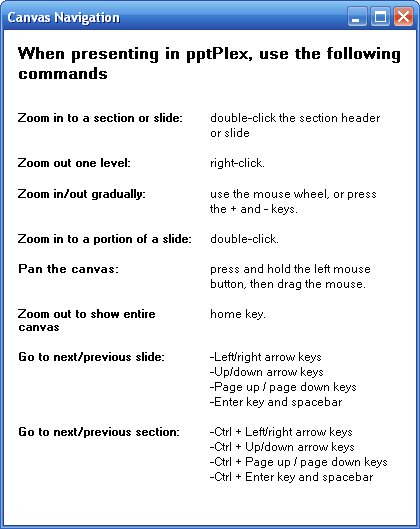
3.Canvas Navigation


4.Live Content
To add presentation data from another microsoft office file, like Excel. If there’s changes in file, this feature automatically updates the content.
1. Install pptPlex, this add-in only works in Office 2007

2. Install plugin SaveToPDfandXPS, if you haven’t install it.


Installation
Download Link


1.pptPlex Installer

2.plugin save as Pdf and XPS


Also, you can use Mobile Witch Bluetooth remote Control to make your Presentation better

Thanks for visiting MahendraPuji(dot)com | Website: www.mahendrapuji.com | E-mail: mail@mahendrapuji.com

Rabu, 06 Maret 2013

Posted by Mahendra Puji
No comments | 18.59
SILABUS MATA KULIAH IT FOR TEACHING ENGLISH
PROGRAM STUDI PENDIDIKAN BAHASA INGGRIS
UNIVERSITAS NUSANTARA PGRI KEDIRI

MATA KULIAH                               : IT FOR TEACHING
KODE MATAKULIAH                      :
BOBOT SKS
                                   : 2 SKS
KELAS / SEMESTER                       : 3 / GENAP 2012-2013
JUMLAH PERTEMUAN                   : 16 x PERTEMUAN
DOSEN                                          : MAHENDRA PUJI PERMANA AJI, S.Pd


Download Syllabus,  Click Here

Download the schedule for IT for Teaching class, Click Here


Thanks for visiting MahendraPuji(dot)com | Website: www.mahendrapuji.com | E-mail: mail@mahendrapuji.com

Categories

Followers

Line Contact

Cell No : +6285736802500
BB pin : 313191d8
Website : www.mahendrapuji.com
E-mail : mail@mahendrapuji.com
Joint FB : www.facebook.com/mahe.jenny