Selasa, 12 Maret 2013

Posted by Mahendra Puji
No comments | 09.21

PptPlex is an Office Labs experiment that uses Plex technology to give you the power to zoom in and out of slide sections and move directly between slides that are not sequential in your presentation.

System requirements

Supported operating systems: Windows 7, Windows Vista, Windows XP
Windows XP, Windows Vista & Windows 7 32/64 bit Microsoft Office PowerPoint 2010 or 2007 Office language must be set to English for all functionality to work as designed.


Instructions
1) Check that your computer meets the requirements 
2) Download and install pptPlex 
3) Open a presentation in PowerPoint 
4) Click the pptPlex tab at the top to see all the buttons needed to use pptPlex. 
5) Click the “insert new section” button to add a few sections. 
6) Click the “Canvas background” button to select a background for the canvas. 
7) Click the “From Overview” button to view your presentation.


PptPlex is a new project from Microsoft Office Labs as a new method for slide prsentation with Power Point 2007. pptPlex uses Plex technology to give you the power to zoom in and out of slide sections and move directly between slides that are not sequential in your presentation. pptPlex is an Add-in that allow us to group our presentation slide in one Canvas.
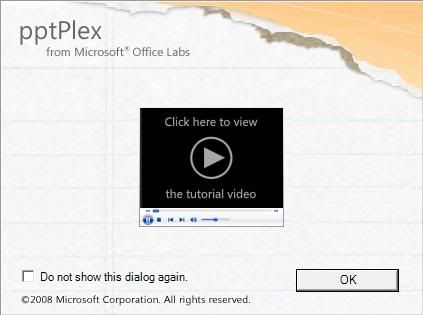

Things with pptPlex :
1.Section
Section is a feature to divide our slide.
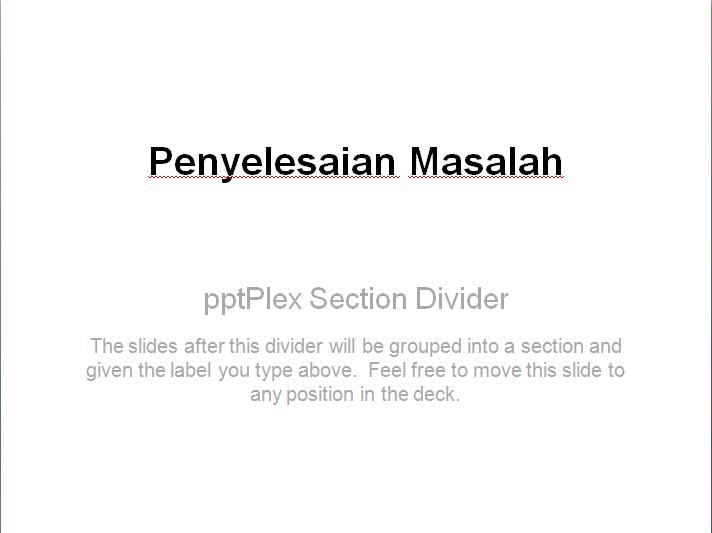


How to Use Section Tutorial:

watch the video here


2.Canvas Background / Overview
Overview is a Canvas of a whole presentation which divided into a few section.
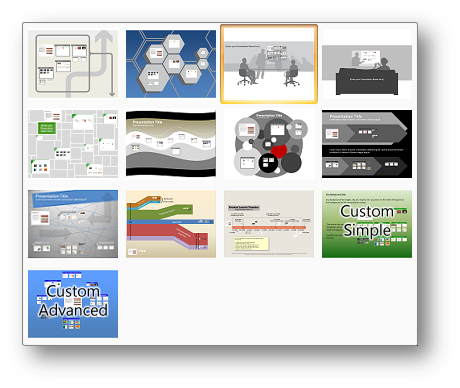
How To Make a Background in a Canvas:


3.Canvas Navigation
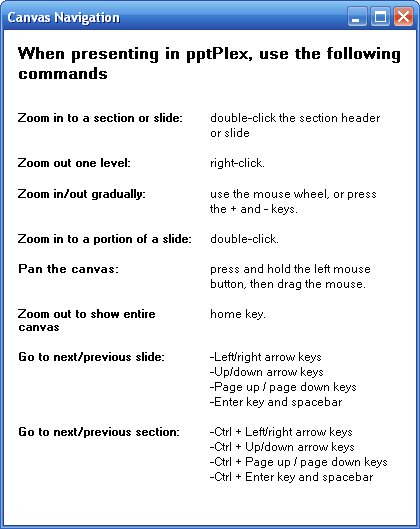


4.Live Content
To add presentation data from another microsoft office file, like Excel. If there’s changes in file, this feature automatically updates the content.
1. Install pptPlex, this add-in only works in Office 2007

2. Install plugin SaveToPDfandXPS, if you haven’t install it.


Installation
Download Link


1.pptPlex Installer

2.plugin save as Pdf and XPS


Also, you can use Mobile Witch Bluetooth remote Control to make your Presentation better

Thanks for visiting MahendraPuji(dot)com | Website: www.mahendrapuji.com | E-mail: mail@mahendrapuji.com

Rabu, 06 Maret 2013

Posted by Mahendra Puji
No comments | 18.59
SILABUS MATA KULIAH IT FOR TEACHING ENGLISH
PROGRAM STUDI PENDIDIKAN BAHASA INGGRIS
UNIVERSITAS NUSANTARA PGRI KEDIRI

MATA KULIAH                               : IT FOR TEACHING
KODE MATAKULIAH                      :
BOBOT SKS
                                   : 2 SKS
KELAS / SEMESTER                       : 3 / GENAP 2012-2013
JUMLAH PERTEMUAN                   : 16 x PERTEMUAN
DOSEN                                          : MAHENDRA PUJI PERMANA AJI, S.Pd


Download Syllabus,  Click Here

Download the schedule for IT for Teaching class, Click Here


Thanks for visiting MahendraPuji(dot)com | Website: www.mahendrapuji.com | E-mail: mail@mahendrapuji.com

Kamis, 28 Februari 2013

Posted by Mahendra Puji
No comments | 09.24


1. Google Docs (Web: Gratis)
2 5 Alternatif pengganti PowerPoint
Dengan menggunakan Google Docs, Anda dapat mengundang user lain untuk berkolaborasi dalam membuat presentasi. Selain itu, keunggulan presentasi dengan Google Docs adalah Anda bisa melakukan presentasi dimana audience berada dalam satu ruangan atau terpisah, tetapi terkoneksi dengan Internet. untuk fitur-fitur lainnya hampir sama dengan software presentasi kebanyakan. Misal mengganti background, memasukkan video (embed), Mengimpor dari presentasi yang sudah ada, dsb.

2. Keynote (Mac: $ 19,99)
11 5 Alternatif pengganti PowerPoint
Keynote Apple dapat dibeli sebagai produk yang berdiri sendiri, atau sebagai bagian dari Apple’s iWork productivity suite, dan mungkin salah satu yang paling intuitif dan mudah digunakan. Keynote Bisa mengimportdata dari berbagai format, memiliki fitur-fitur presentasi yang lengkap, template yang bagus, dan terutama adalah kemampuan menggunakan multiple touch pada layar yang membuat keynote menjadi penting bagi presenter.

3. LibreOffice / OpenOffice.org Impress (Windows / Mac / Linux: Gratis)
5 5 Alternatif pengganti PowerPoint
LibreOffice Impress adalah sebuah paket aplikasi perkantoran yang kompatibel dengan aplikasi powerpoint. Tujuannya adalah menghasilkan aplikasi perkantoran yang mendukung format ODF tanpa bergantung pada sebuah pemasok dan keharusan mencantumkan hak cipta. Sebagai sebuah perangkat lunak bebas dan gratis, LibreOffice bebas untuk diunduh, digunakan, dan didistribusikan. LibreOffice merupakan proyek pengembangan dari OpenOffice.org yang sejak tahun 2010 sudah diakuisisi oleh Oracle. Secara umum, fitur-fitur yang ada di Impress hampir sama dengan PowerPoint.

4. Beamer (LaTeX) (Windows / Mac / Linux: Gratis)
31 5 Alternatif pengganti PowerPoint
Jika anda seorang penggemar LaTeX , atau harus menerapkannya untuk tesis sarjana Aanda, anda akan menyukai Beamer. Dimana software presentasi lainnya memberikan GUI, Beamer mengharuskan anda untuk membuat presentasi anda dalam bahasa markup kustom yang bekerja untuk hampir semua dokumen LaTeX. LaTeX sangat populer dalam dunia akademis dan oleh orang-orang teknis yang lebih suka menulis presentasi mereka sendiri dan men-tweak setiap fitur yang mungkin daripada menyerahkan kontrol ke GUI

5. Prezi (Web / Win / Mac / Linux / iOS: Gratis, “Enjoy $ 59/yr,” Pro $ 159/yr)
4 5 Alternatif pengganti PowerPoint
Prezi adalah sebuah software untuk presentasi yang unik. Selain untuk presentasi, Prezi juga dapat digunakan sebagai alat untuk mengeksplorasi dan berbagi ide di atas kanvas virtual. Prezi menjadi unggul karena program ini menggunakan Zooming User Interface, yang memungkinkan pengguna Prezi untuk memperbesar dan memperkecil tampilan media presentasi kita. Keunikan presentasi dengan Prezi tidak perlu berpindah dari satuslide ke slide lain. Cukup dengan satu kanvas besar yang bisa disisipi gambar, video, data, dan lain-lain serta cukup digeser-geser.


Thanks for visiting MahendraPuji(dot)com | Website: www.mahendrapuji.com | E-mail: mail@mahendrapuji.com

Selasa, 01 Januari 2013

Posted by Mahendra Puji
5 comments | 18.56

Categories

Followers

Line Contact

Cell No : +6285736802500
BB pin : 313191d8
Website : www.mahendrapuji.com
E-mail : mail@mahendrapuji.com
Joint FB : www.facebook.com/mahe.jenny